Home MINWANG Next

iHuman

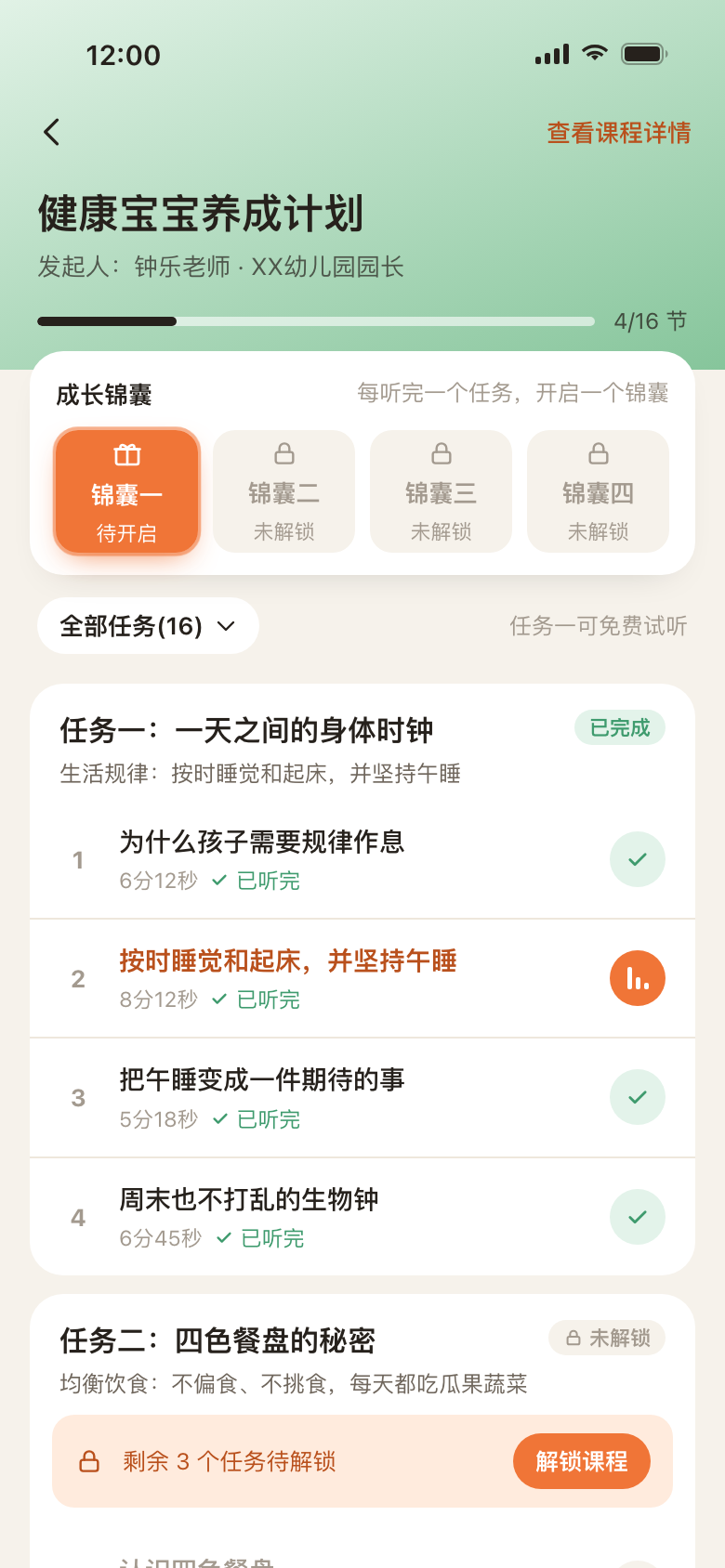
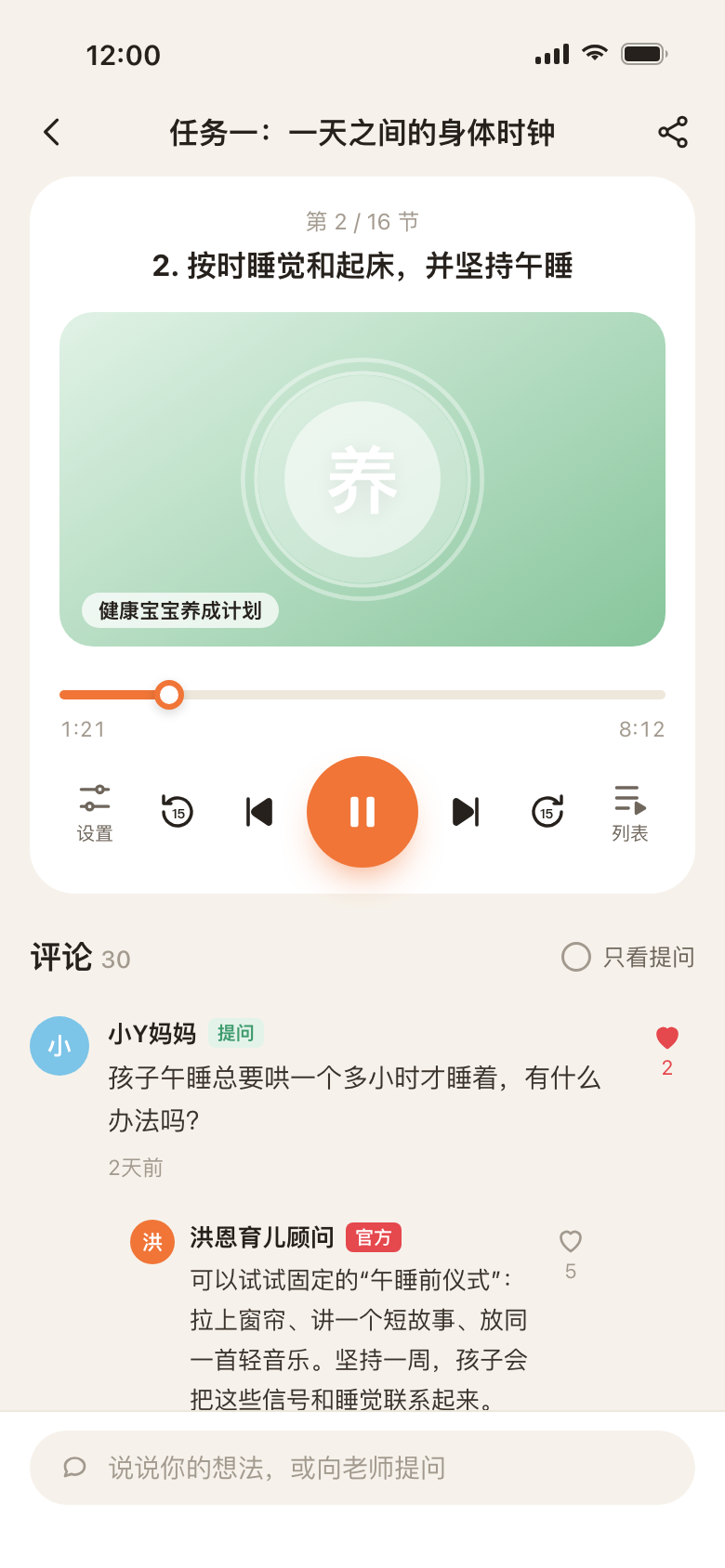
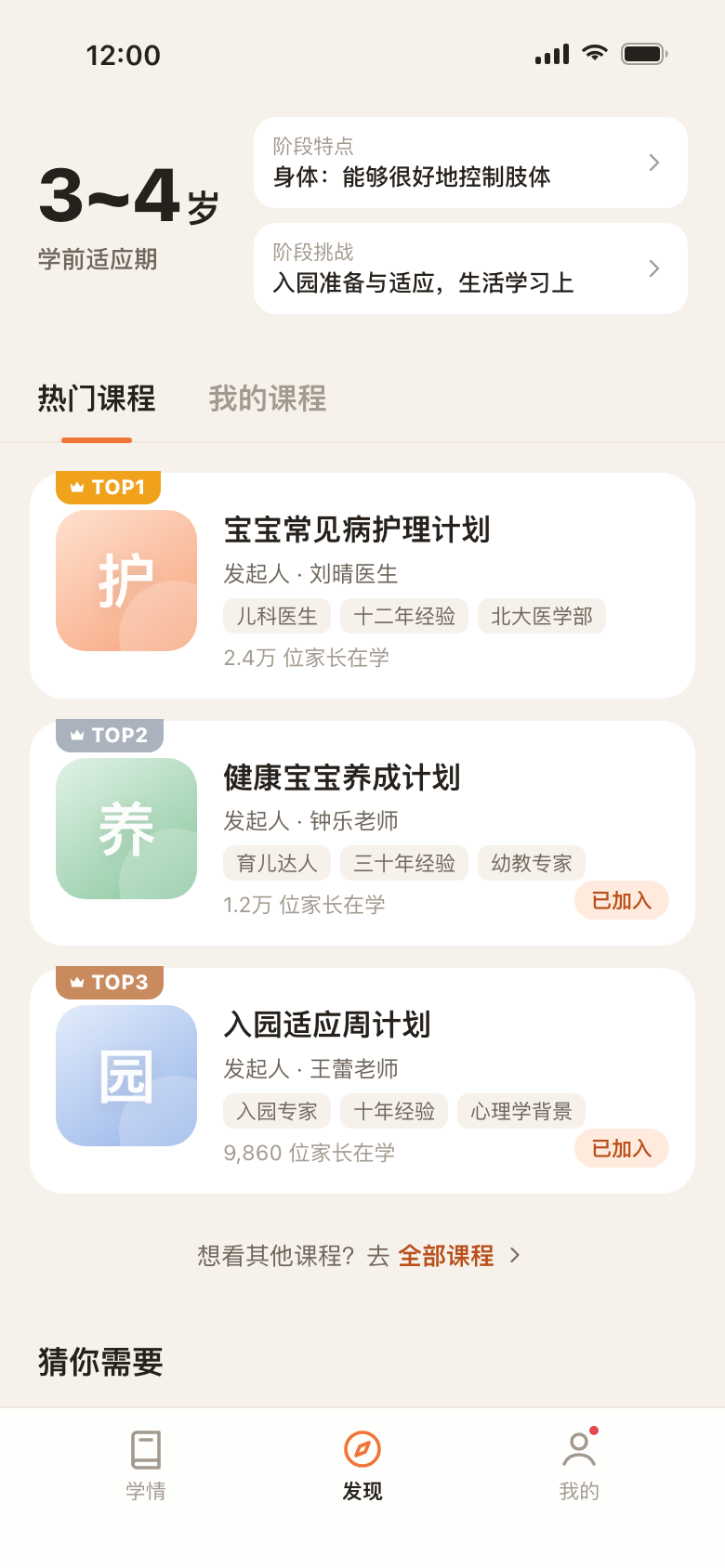
Home screen recommending parenting courses for a child aged 3 to 4 Course task list with tip cards and a free first task Audio player with comments and an official answer to a parent's question
Industry
EdTech · Parenting
My role
Product designer
Platform
Mobile app
Timeline
May–August, 2021

Designing an audio course experience that gives parents a reason to keep coming back.

iHuman (洪恩) makes educational apps for children aged 3 to 8. In 2021, the company started an internal exploration: a companion app for the parents behind those children.

As the product designer, I worked from research synthesis to a hi-fi prototype of the app’s audio courses, and ideated five ways to help parents actually finish them.

Children use the apps. Parents decide if they stay.

Every iHuman product was built for children, but parents are the ones who download, pay and decide when to stop. iHuman’s senior management wanted to explore a product made for parents, one that could strengthen that relationship and reduce churn across iHuman’s apps.

The open question was simple: if iHuman built something for parents, what would they actually want from it?

222 parents told us what they need.

The user research team surveyed existing iHuman parents and received 222 responses. Most respondents were mothers, and most of their children were between 3 and 5.

Two questions shaped the product direction.

If there were a product for parents, what would you want it to do?
  1. Answer and guide me through problems in my child’s growth65.3%
  2. Show my child’s learning in iHuman apps, with suggestions60.4%
  3. Plan my child’s growth systematically with experts56.3%
  4. Discuss parenting questions with other parents44.1%
  5. Learning reports from iHuman apps38.3%
  6. Parenting news27.9%

Multiple choice, n = 222

What would you like to see about your child’s learning?
  1. Suggestions and a plan to improve their results72.1%
  2. What they’ve mastered and where they struggle68.9%
  3. Learning status and data52.3%

Multiple choice, n = 222

Parents want guidance, not just data.

In both questions, advice ranked above reporting. Parents wanted answers to the problems they meet while raising their child (65.3%) and suggestions to improve learning (72.1%) more than they wanted reports (38.3%) or raw data (52.3%).

Mothers born in the 1980s and 90s, already using iHuman

Age
30–45
Annual income
¥300k–600k
Gender
Mostly women
Tags
Mom · iHuman user

Pain points

  • Doesn’t know how to plan for her child’s growth
  • Gets generic tips, not learning advice for her own child
  • Has no one to ask when problems come up as her child grows

V1 focused on the two things parents asked for most:

  • Learning suggestions: turning each child’s activity in iHuman apps into stage-appropriate advice for parents. This was mostly content work: structuring and writing the suggestions.
  • Audio courses: short “plans” from teachers and paediatricians, organized by the child’s developmental stage.

I owned the audio course experience, which raised one question:

How might we help busy parents finish an audio course, and come back for the next one?

28 plans, mapped to five sensitive periods.

V1 content was organized around the child’s age rather than by topic, so a parent only sees what fits their child’s current stage. In total: 28 plans, roughly 80 to 120 audio episodes and 28 videos, most of them produced with partners.

AgeSensitive periodPlansTopics
3–4Preschool adjustment4Language (2) · Getting ready for kindergarten · Parents’ relationship
4–5Interest discovery9Interests (3) · Subjects (3) · Emotions · Peers · Child psychology
5–6School readiness3Reading · Learning attitude · Kindergarten to primary school
6–7School adjustment4General skills · Study habits · Daily routines
7–8Habit building3Study methods · Self-management · School performance
All agesGeneral5Health (3) · Safety · Medical care

Five ideas to keep parents listening.

A course only helps if parents finish it. I looked at how other apps keep people coming back, from livestream shopping to finance and audiobook apps, and sketched five ideas to encourage parents to keep listening.

  1. Preview new plans and reserve a spot (Before a plan). When new plans are coming, a reminder appears on the home screen. Upcoming plans look like regular ones, greyed out, with a release date on top and a reserve button below that shows how many parents have reserved.
  2. Learning stats, and what other parents are listening to (Me tab). A report card sums up the year (“13 plans completed, ahead of 24% of parents”). Below it, two feeds show what parents you follow are listening to, and the most popular plans, each with a comment from another parent.
  3. Quick quizzes that unlock the next episode (Inside a plan). Each episode ends with one short question. Answering it correctly unlocks the next episode; a wrong answer points back to the moment in the audio that explains it.
  4. Switch between listening and reading (Inside a plan). One tap switches a plan from audio to text. Each episode shows a short preview that expands into the full text, so parents can read when they can’t play sound.
  5. Tip cards that sum up what you learned (After each episode). Finishing an episode gives a tip card: the key points in a sentence or two, plus one thing to try today. Parents save the cards they like into My tip cards, a personal summary of the course.

01 · Before a plan

Preview new plans and reserve a spot

When new plans are coming, a reminder appears on the home screen. Upcoming plans look like regular ones, greyed out, with a release date on top and a reserve button below that shows how many parents have reserved.

Why: build anticipation and social proof before a plan starts.

02 · Me tab

Learning stats, and what other parents are listening to

A report card sums up the year (“13 plans completed, ahead of 24% of parents”). Below it, two feeds show what parents you follow are listening to, and the most popular plans, each with a comment from another parent.

Why: visible progress and peers as motivation.

03 · Inside a plan

Quick quizzes that unlock the next episode

Each episode ends with one short question. Answering it correctly unlocks the next episode; a wrong answer points back to the moment in the audio that explains it.

Why: active recall helps advice stick, and progress feels earned.

04 · Inside a plan

Switch between listening and reading

One tap switches a plan from audio to text. Each episode shows a short preview that expands into the full text, so parents can read when they can’t play sound.

Why: meet parents where they are, not only when they can listen.

05 · After each episode

Tip cards that sum up what you learned

Finishing an episode gives a tip card: the key points in a sentence or two, plus one thing to try today. Parents save the cards they like into My tip cards, a personal summary of the course.

Why: advice only helps once it’s used in daily life.
From ideas to hi-fi

Reviewing the five ideas with the team, we asked one question of each: does it work on day one of V1? Only one survived, as a merge of two ideas.

  1. 01

    Preview new plans and reserve a spot

    Parked

    V1 launched with an initial set of plans. Which plans came next would depend on what parents actually listened to, so there was nothing reliable to preview yet.

  2. 02

    Learning stats, and what other parents are listening to

    Parked

    A brand-new app has almost no listening data. A report card and a “most popular” feed built on so little would feel empty, so we left them until the data grows.

  3. 03 + 05

    Quizzes and tip cards, merged into one

    In hi-fi

    A quiz after every episode would put too much pressure on parents who are already short on time. We kept what the quiz was for, reflecting on what was just learned, and moved it into the tip card: after each task, parents get a tip or a small thing to try, and can save it.

  4. 04

    Switch between listening and reading

    Cut

    V1 was a bet on audio. Listening is low effort and fits anywhere, on the commute or while cooking, while reading asks more of parents, and many are reluctant to do it. A reading mode would pull against that direction.

The social idea behind 01 and 02 still made it in, in a lighter form that doesn’t need much data: every plan shows how many parents are learning it, comments are featured on the home screen, and parents can ask official advisors questions right under each episode.

The whole listening loop, clickable.

The hi-fi prototype covers the full loop: find a course, join it, listen to the free task, unlock the rest, open a tip card, then ask a question and get an answer. Try it below, or open it in a new tab to jump between screens.

Open the prototype

It never shipped, so here’s how I’d measure it.

I left iHuman at the end of August 2021, and the parent app did not launch. If it had, these are the signals I would track.

MetricWhat it measuresWhy it matters
Plan completion rateWhether parents finish what they startThe core goal behind all five ideas. If completion stays low, the content or its length needs rethinking before adding more mechanics.
Free task to unlock rateValue of the free first taskShows whether trying one task convinces parents the rest is worth it.
Tip card opens and savesAppeal of the rewardSaved cards suggest the takeaways are useful outside the app, not only a badge.
Return visits from answersPull of expert Q&AAnswers are designed to bring parents back. This shows whether they do.
Children’s app retentionThe original business goalCompare churn in iHuman’s children’s apps between families who use the parent app and those who don’t.

Engagement features should serve the content, not replace it.

Much of V1 was content work: mapping 28 plans to five developmental stages and deciding what a parent should see first. It showed me that in a content product, designing the structure matters as much as designing the screens.

Each of the five ideas is a different way to help parents finish a course. Looking back, I would test which ones actually drive completion before adding more. Unlocks and rewards can easily feel like pressure to parents who are already short on time.

Leaving before launch also meant I never saw real usage. Since then, I write down the success metrics while I design, so the next person can tell whether a decision worked.